DocsShaping data
Formulas
A formula works a value out for each row: a price with tax, a date in another layout, one word or another depending on a field. Most fields don't need one. A formula is for when nothing simpler gives the value.
Try these first
Map fields has plain choices for what most mappings need. People can read them at a glance, and they work on every plan:
- A field as it is, or with Uppercase, lowercase or trim spaces or Turn into a number.
- Text with fields: words with field values in them, such as Shopify order {{ name }}.
- If it's empty, use: another field, or a fixed value, when a field is empty.
- Translate values: PAID becomes Paid, a store's SKU becomes the one QuickBooks uses.
- A fixed value: the same value on every row.
- One line from the row: a list such as invoice Lines with one line made from the row's own fields.
Reach for A formula when the value has to be calculated, or chosen from more than one case. A formula stays available on every field, built-in actions included.
Where you can write a formula
| Where | What the formula gives |
|---|---|
| Map fields, A formula | The value of a field or column, for each row. |
| Filter rows, as an expression | True for the rows to keep. |
| Only for some rows and End run if | True for the rows the step works on, or true to end the run. End run if can also read rowsSoFar, rowsPulled, rowsSkipped and records. |
| Remove duplicates, Key | The value that tells rows apart, such as concat(row.order_id, "|", row.sku). |
| Get details for each row | Each value sent for a row, and the Body of a POST request. |
| Read a file from a link | The link, when Work out the link with a formula is on. |
| Send a message and report requests | Parts of the text in double curly brackets, such as {{ rowCount }} or {{ daysAgo(7) }}. |
What a formula may use depends on the plan, and the box says so when a plan doesn't include it. Map fields formulas: On Starter, Pro and Business. Filter expressions: On Starter, Pro and Business. Only for some rows: On Pro and Business.
Fields, text and numbers
- row.status is the row's status field. A name with a space, a dot or a dash goes in brackets and quotes: row["unit price"], row["customer.email"].
- A field inside another is row.customer.email. After Split a list into rows and in a file's columns, the name holds the dot itself, so write row["line.sku"].
- Text goes in double quotes: "paid". Numbers don't: 100, 1.2.
- A file's values arrive as text, even 12.50. Use number(row.price) before calculating or comparing with them. Values from an API keep their type.
- Dates are text too, such as 2026-10-20 or 2026-10-20T14:32:10Z. The date functions below read both.
- A missing field is empty, not an error, so coalesce and default can fill it.
Operators
| Write | For |
|---|---|
| + - * / | Arithmetic. + also joins two texts. |
| == | Is equal to: row.status == "paid". Text compares with upper and lower case as written. |
| != | Is not equal to: row.status != "voided". |
| < and > | Is less than, is more than: number(row.total) > 100. |
| <= and >= | Is less than or equal to, is more than or equal to: number(row.quantity) <= 5. |
| and or not | Combine conditions: row.status == "paid" and number(row.total) >= 10. |
| condition ? a : b | One value or another: number(row.total) >= 100 ? "large" : "small". |
| in [...] | Whether a value is in a list: row.country in ["CA", "MX"]. |
| [0], [:20] | The first item of a list, or the first 20 characters of a text. |
Ladeworks functions
Every example on this page is checked against Ladeworks itself: on the fields shown, the formula gives exactly that. Today in the examples is 2 November 2026.
| Function | What it does, with an example |
|---|---|
| concat(a, b, ...) | Joins values into one text. A value that is empty or missing adds nothing. concat("Order ", row.number) gives "Order 1001" when row.number is "1001". |
| coalesce(a, b, ...) | The first value that is not empty. Spaces alone count as empty; 0 and false do not. coalesce(row.billing_name, row.customer_name, "Guest") gives "Ana Silva" when row.billing_name is "", row.customer_name is "Ana Silva". |
| default(value, fallback) | The value, or the fallback when the value is empty. default(row.phone, "none") gives "none" when row.phone is "". |
| translate(value, {"from": "to", ...}, otherwise) | The To of the From that matches, ignoring upper and lower case and spaces at the ends. Anything not listed is kept as it is, or replaced by the third value when there is one. translate(row.status, {"paid": "Paid", "pending": "Waiting"}, "Other") gives "Paid" when row.status is "PAID". |
| text(value) | The value as text. Nothing becomes empty text. concat(text(row.quantity), " units") gives "3 units" when row.quantity is 3. |
| number(value) | Reads a number from text such as "12.50". A file's values arrive as text, so use it before calculating or comparing. number(row.price) * 2 gives 25 when row.price is "12.50". |
| roundTo(value, digits) | Rounds to that many decimal places, halves away from zero. roundTo(row.price * 1.2, 2) gives 11.99 when row.price is 9.99. |
| get(row, "a.b") | A field by its name written as text, dots included. Missing gives nothing instead of an error. get(row, "customer.email") gives "ana@example.com" when row.customer is {"email":"ana@example.com"}. |
| parseDate(value, layout, timeZone) | Reads a date. Without a layout it reads 2026-10-31, 2026-10-31T14:32:10Z, 10/31/2026, 31.10.2026 and 20261031. Give a layout for anything else. formatDate(parseDate(row.date, "dd/MM/yyyy"), "yyyy-MM-dd") gives "2026-10-31" when row.date is "31/10/2026". |
| formatDate(date, layout, timeZone) | Writes a date in the layout you give: yyyy, yy, MM, dd, HH, mm and ss. Without a time zone it uses the workflow's. formatDate(row.created, "dd/MM/yyyy") gives "20/10/2026" when row.created is "2026-10-20T14:32:10Z". |
| today() | Today's date as yyyy-MM-dd, in the workflow's time zone. today() gives "2026-11-02". |
| startOfToday() | Midnight at the start of today, as a timestamp in the workflow's time zone. Useful for the end of a report's period. startOfToday() gives "2026-11-02T00:00:00Z". |
| daysAgo(n) | Midnight at the start of the day n days ago, as a timestamp. Useful for the start of a report's period. daysAgo(7) gives "2026-10-26T00:00:00Z". |
| before(date, date) | Whether the first day is before the second. Compares calendar days, and is false (never an error) when either is not a date. before(row.due_date, today()) gives true when row.due_date is "2026-10-15". |
| after(date, date) | Whether the first day is after the second. after(row.ship_date, "2026-11-01") gives true when row.ship_date is "2026-11-05T09:00:00Z". |
| onOrBefore(date, date) | Whether the first day is the same day as the second or before it. onOrBefore(row.due_date, "2026-10-15") gives true when row.due_date is "2026-10-15T23:30:00Z". |
| onOrAfter(date, date) | Whether the first day is the same day as the second or after it. onOrAfter(row.created, daysAgo(30)) gives true when row.created is "2026-10-20". |
| includes(text, part) | Whether the text holds the part, with upper and lower case as written. includes(row.note, "gift") gives true when row.note is "This is a gift, no prices please". |
More functions
| Function | What it does, with an example |
|---|---|
| upper(text) | The text in capitals. Also a choice under Change the value. upper(row.currency) gives "USD" when row.currency is "usd". |
| lower(text) | The text in small letters. lower(row.email) gives "ana@example.com" when row.email is "Ana@Example.com". |
| trim(text) | The text without spaces at either end. trim(row.sku) gives "MUG-12" when row.sku is " MUG-12 ". |
| len(value) | How many characters a text has, or how many items a list has. len(row.lineItems) gives 2 when row.lineItems is [{"sku":"A"},{"sku":"B"}]. |
| split(text, separator) | Cuts text into a list at each separator. [0] is the first part. split(row.closedate, "T")[0] gives "2026-10-16" when row.closedate is "2026-10-16T17:00:00Z". |
| join(list, separator) | Joins a list of texts into one, with the separator between them. join(row.tags, ", ") gives "wholesale, repeat" when row.tags is ["wholesale","repeat"]. |
| replace(text, old, new) | Replaces every copy of one text with another. replace(row.phone, "-", "") gives "5550172" when row.phone is "555-0172". |
| map(list, {{...}}) | Makes something for each item of a list. # is the item. Two pairs of braces make an object for each item. map(row.lineItems, {{"sku": #.sku, "qty": #.quantity}}) gives [{"sku":"MUG-12","qty":2}] when row.lineItems is [{"sku":"MUG-12","quantity":2,"price":18}]. |
| filter(list, condition) | Keeps the items of a list where the condition is true. len(filter(row.lineItems, #.quantity > 1)) gives 1 when row.lineItems is [{"quantity":2},{"quantity":1}]. |
| sum(list, value) | Adds up a value of every item of a list. sum(row.lineItems, #.quantity * #.price) gives 55 when row.lineItems is [{"quantity":2,"price":18},{"quantity":1,"price":19}]. |
| find(list, condition) | The first item of a list where the condition is true, or nothing. find(row.lineItems, #.sku == "TEA-50").price gives 19 when row.lineItems is [{"sku":"MUG-12","price":18},{"sku":"TEA-50","price":19}]. |
| abs(number) | The number without its minus sign. abs(row.amount) gives 12.5 when row.amount is -12.5. |
| max(a, b) | The larger number. min(a, b) is the smaller one. max(row.discount, 0) gives 0 when row.discount is -3. |
Lists
A field can hold a list, such as an order's line items. map(row.lineItems, ...) does something for each item, and inside it # is the item: #.sku. To make an object for each item, use two pairs of braces: map(row.lineItems, {{"sku": #.sku, "qty": #.quantity}}). The outer pair is what to do with each item and the inner pair is the object.
filter keeps some items, sum adds a value up across them, find picks the first match, and len counts them. A list field of a destination, such as invoice Lines, is a map formula that Map fields shows as one row for each line field, so most lists need no typing.
Dates and time zones
formatDate writes a date in the layout you give, with yyyy, yy, MM, dd, HH, mm and ss: formatDate(row.created, "dd/MM/yyyy"). parseDate reads a date in a layout Ladeworks doesn't know: parseDate(row.date, "dd/MM/yyyy").
today(), startOfToday() and daysAgo(n) use the workflow's time zone: the time zone of its schedule, or UTC when it has none. formatDate and parseDate take a time zone as a third value, such as "America/New_York".
before, after, onOrBefore and onOrAfter compare calendar days, so 2026-10-15 and 2026-10-15T23:30:00Z are the same day. A row with an empty or unreadable date simply doesn't match, instead of stopping the run.
Recipes
| To get | Write, and what it gives |
|---|---|
| A price with tax | roundTo(number(row.price) * 1.2, 2) gives 29.99 when row.price is "24.99". |
| A line total | number(row.quantity) * number(row.unit_price) gives 13.5 when row.quantity is "3", row.unit_price is "4.50". |
| One value or another | number(row.total) >= 100 ? "large" : "small" gives "large" when row.total is "120". |
| Several cases | row.country == "US" ? "Domestic" : (row.country in ["CA", "MX"] ? "North America" : "International") gives "North America" when row.country is "MX". |
| The date part of a timestamp | split(row.closedate, "T")[0] gives "2026-10-16" when row.closedate is "2026-10-16T17:00:00Z". |
| A date in another layout | formatDate(row.order_date, "MM/dd/yyyy") gives "10/20/2026" when row.order_date is "2026-10-20". |
| Text cut to a length | len(row.memo) > 20 ? row.memo[:20] : row.memo gives "Leave the parcel at " when row.memo is "Leave the parcel at the front desk". |
| The last part of an ID | split(row.id, "/")[len(split(row.id, "/")) - 1] gives "5612345678901" when row.id is "gid://shopify/Order/5612345678901". |
| Whether a list holds a value | "wholesale" in split(row.tags, ", ") gives true when row.tags is "wholesale, repeat". |
| A total of a list | roundTo(sum(row.lineItems, number(#.amount)), 2) gives 15.35 when row.lineItems is [{"amount":"10.10"},{"amount":"5.25"}]. |
| A key made of two fields | concat(row.order_id, "|", row.sku) gives "1001|MUG-12" when row.order_id is "1001", row.sku is "MUG-12". |
| A field whose name has a space or a dot | row["unit price"] * row["line.quantity"] gives 12 when row["unit price"] is 4, row["line.quantity"] is 3. |
Checking a formula
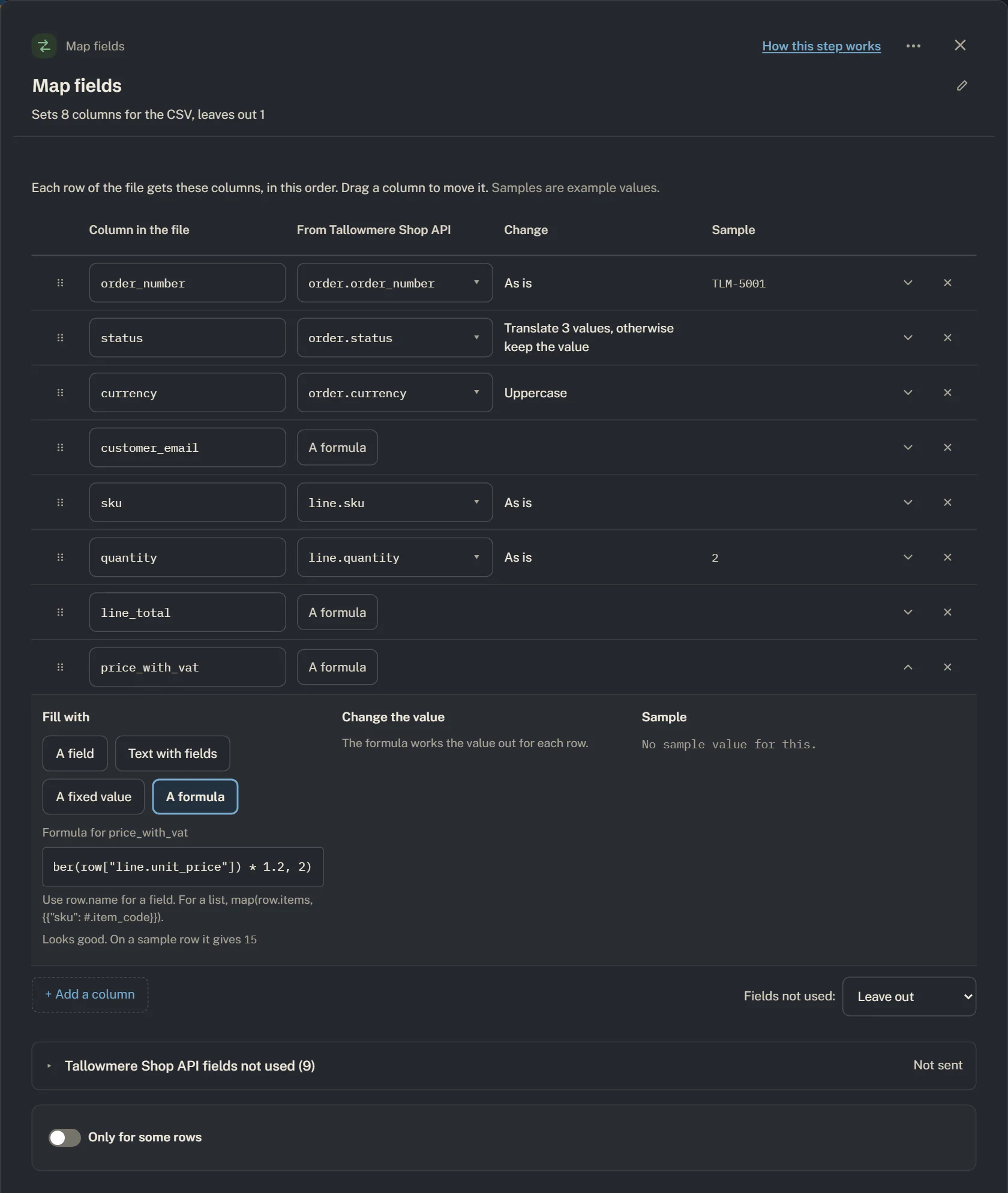
The formula box checks the formula as you type and shows what it gives on a sample row, such as "Looks good. On a sample row it gives 15". A name the rows don't have, a missing bracket or a function that doesn't exist is named in plain words, and the step can't be saved until it is fixed.
 (opens the full size image in a new tab)
 (opens the full size image in a new tab)
When a formula fails on a row
A formula can be right and still fail on one row, such as number(row.price) on a row whose price is "n/a". That row is skipped, run details say which row and why in plain words, and the other rows go on. Fix the formula or the data, then retry the skipped rows.
To keep a row going when a field may be empty, give it a fallback: coalesce(row.phone, ""), or If it's empty, use in Map fields.