DocsShaping data
Get details for each row
Calls another endpoint once for each row and adds what it returns, for example a list of orders and then each order's full record. On Starter, Pro and Business.
It is the step to use when an API gives you a list in one place and the details in another: get the list from /jobs.json, then GET /jobs/:slug.json for each row, then save a CSV. Create a workflow can build it for you when you start from the details endpoint.
Settings, in order
 (opens the full size image in a new tab)
 (opens the full size image in a new tab)
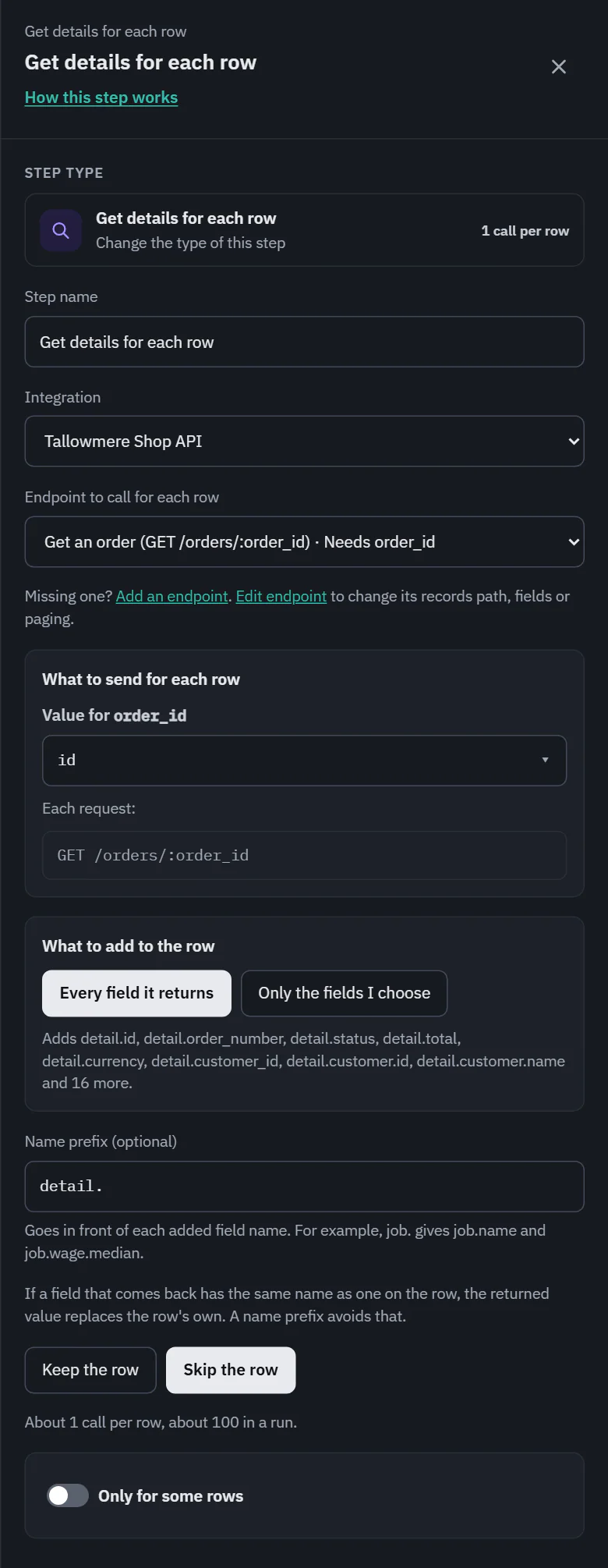
- Endpoint to call for each row: the GET endpoints of the integration. Those with a placeholder in the path, such as :slug, come first.
- What to send for each row: one line for each value the endpoint needs, path placeholders first, then required query and header fields. Value for and the name uses the same searchable field list as Filter rows and Map fields. A field with the same name is chosen already (slug to slug; a name ending in id finds order.id, else id). Choose another field, or write an expression with + Write an expression. On Starter, Pro and Business. Under it, the request for the first sample row, such as GET /jobs/3d-animator-salary.json, or the template GET /jobs/:slug.json. Reading the sample costs nothing.
- What to add to the row: Every field it returns, or Only the fields I choose with a checkbox for each field the endpoint returns.
- Name prefix (optional): goes in front of each added name. detail. gives detail.shipping_address.city.
- If nothing comes back: Keep the row (the default) or Skip the row. A 404 or an empty answer counts. Skipped rows are listed in run details with the cause Source data.
If a returned field has the same name as one the row already has, after the prefix, the returned value replaces the row's own. The drawer names the clashing fields and suggests a prefix to keep both.
The steps after it (Filter rows, Map fields, Write a CSV, Push) list the added fields with their prefix, so a CSV written after the step has the detail columns.
Cost and the run line
1 API call for each row. A gray line in the drawer says "About 1 call per row, about 100 in a run". Read the number before you turn a workflow like this on: a list of 10,000 rows is 10,000 calls every time it runs. A run shows "100 got details", or "98 got details, 2 skipped". The retries are free.
Only for some rows makes the call for only some of the rows. On Pro and Business.