DocsUsage and billing
The run check
Before a manual run starts, Ladeworks checks whether it fits the calls you have left this month. If it will not, it asks first. A warning never blocks: you can always run anyway, and Ladeworks stops the run call by call at the limit.
When it appears
The check runs when you choose Run now on the Workflows page or in the workflow. It compares the workflow's estimate for one run with the calls left this month, counting calls held by runs going now. Scheduled runs, file and webhook runs and test runs (10 rows) are not checked. A workflow that has never run is estimated on 100 rows, and the dialog says so.
If the run fits, it starts as before. In the builder, a gray note next to the estimate says when one run needs more than what is left.
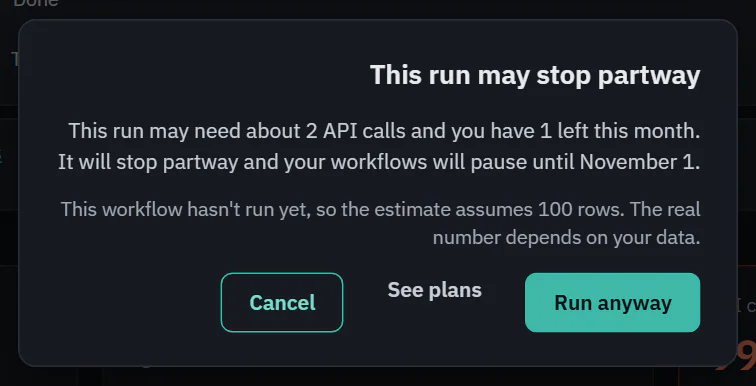
This run may stop partway
 (opens the full size image in a new tab)
 (opens the full size image in a new tab)
It says about how many calls the run may need, how many you have left, that it will stop partway and that your workflows will pause until calls reset. If the workflow has a Push step, it also says whether the next run picks up where this one stopped ("Don't send records that were already sent" is on) or sends every record again, and names the step where that option is off.
- Run anyway starts the run. Ladeworks stops it at the limit and the run ends early.
- Cancel does nothing.
- See plans (when the plan has no extra calls), Allow extra calls (the cap is set to pause) or Raise spending cap, for Owners and Admins, goes to fix the limit first.
This run goes past your included calls
When the run fits under your cap but goes past the included calls, the dialog says "About 2,000 of this run's API calls are beyond your plan's included calls." People who can see billing also see about what that costs. The buttons are Cancel and Run.
If the check itself fails, the run starts without a warning.