DocsShaping data
Push to an endpoint
Sends each row to an API, one request for each row or one for each batch. It is usually the last step.
Settings
 (opens the full size image in a new tab)
 (opens the full size image in a new tab)
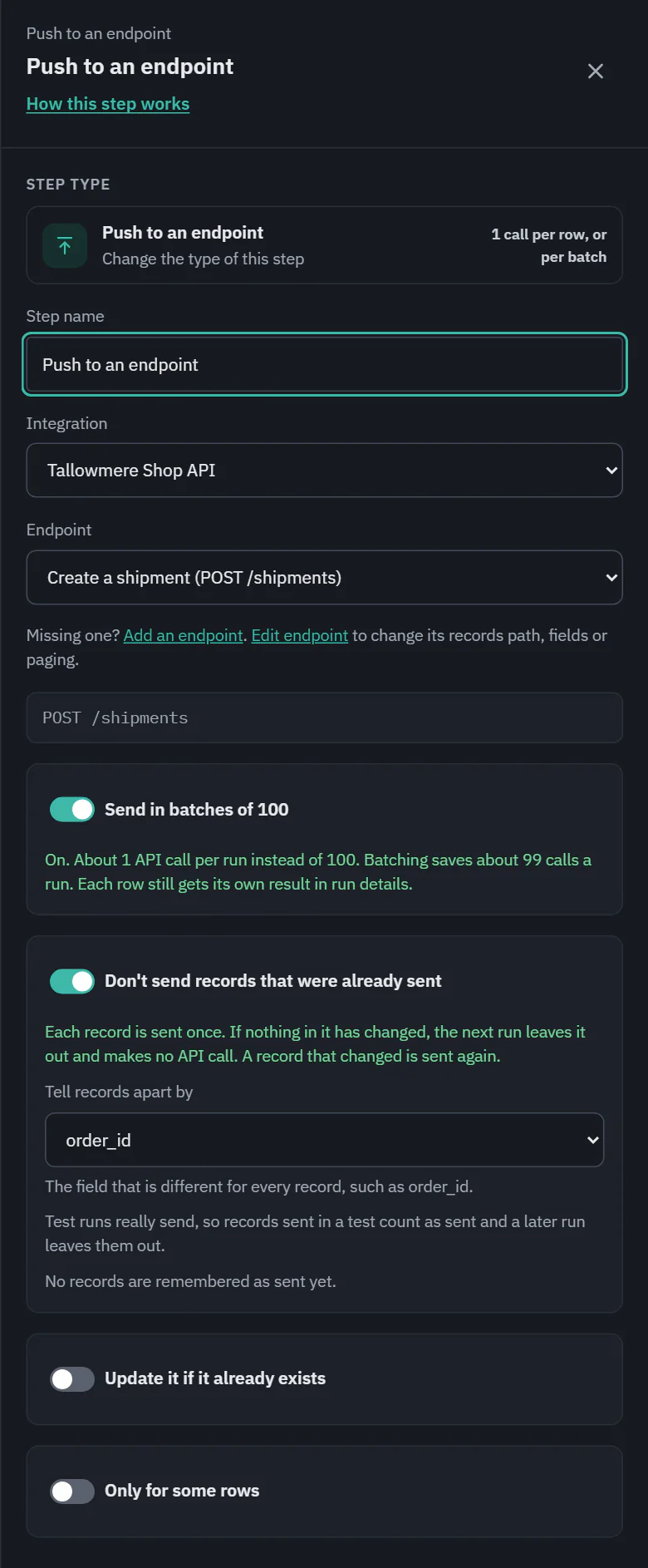
Integration and Endpoint: the endpoint must push data. The address under it shows the request. What goes in the request comes from the rows, so put a Map fields step before it that names the columns the endpoint expects. A required field that nothing fills is the one place Push can fail on every row, and the run says "order_id is required but this row has no value for it".
Send in batches
The switch Send in batches of 100 sends up to 100 rows in each request, so a run makes far fewer API calls. It is on only for endpoints that have a batch version. For one that does not, the line under it says "Create a customer takes one row per request, so batching isn't available for it."
The call savings show right beside it. Off: "Turning this on cuts this step from about 100 API calls to 1." On: "About 1 API calls per run instead of 100. Batching saves about 99 calls a run. Each row still gets its own result in run details." The same number is the link Cut this by about 97% in the builder header. A batch that the API partly refuses names the rows it refused, so skipped rows work the same as without batching.
Don't send records that were already sent
On for every new Push step. The step keeps a ledger: for each record it really sent, its key, a fingerprint of what it sent, the id the other system answered with, and the run. Before sending, it compares:
- Same key and same contents: the record is not sent. It makes no request, costs no call and is not counted as skipped or failed. Run details show it as "Already sent, unchanged".
- Same key and different contents: sent. With update if exists, that updates the record already there.
- A new key: sent.
A record goes in the ledger only after the other system accepts it, so rows that failed or were skipped are tried again next time. Retries, second runs, overlapping runs and test runs all go through the ledger, and a test writes to it too, because a test really sends.
Tell records apart by is the field that is different for every record, such as order_id. Pick for me chooses a likely one (an id, an order number or a reference); with none, records are told apart by their contents. When Update it if it already exists is on, its match field is the key, and the drawer says so.
The drawer counts what is remembered: "No records are remembered as sent yet." or "93 records are remembered as sent." Forget sent records (with a confirmation) deletes the ledger, so the next run sends everything again and the other system may get duplicates. On a step saved before this option existed it starts off, with the gentle suggestion to turn it on. The ledger lives as long as the workflow.
On a workflow's card, the step says "Skips records already sent", or "Leaves out about 93 records already sent" once there is a run to learn from. The estimate takes those out too.
Update it if it already exists
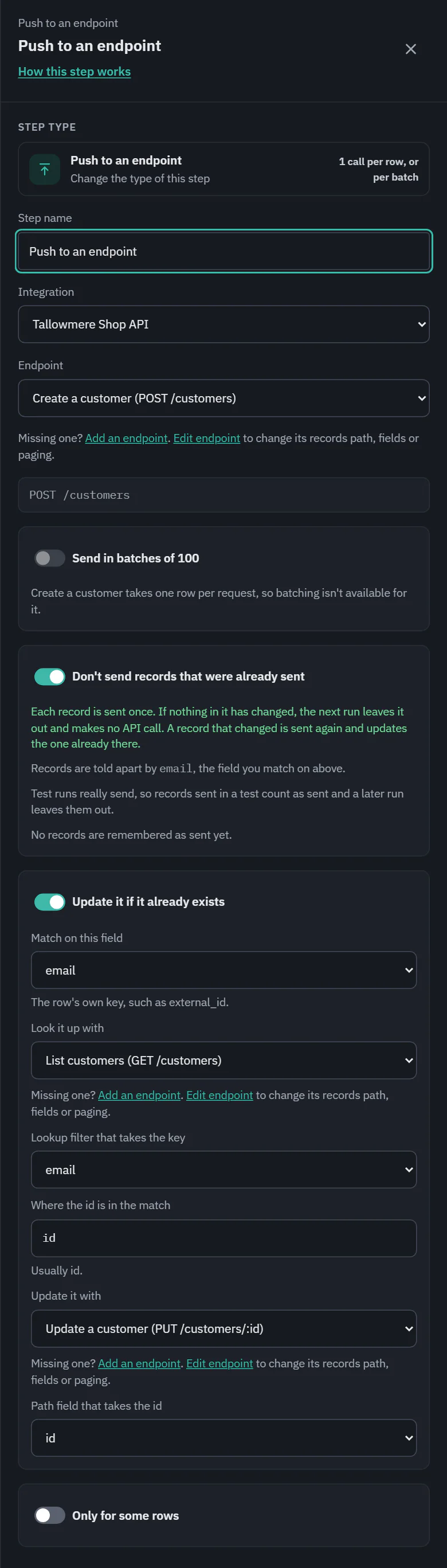
For an API that has no single "create or update" request. Ladeworks looks the record up first and then updates it, or creates it when it is not there. On Starter, Pro and Business. It takes six choices, so it can work with how your API is built:
 (opens the full size image in a new tab)
 (opens the full size image in a new tab)
- Match on this field: the row's own key, such as email.
- Look it up with: a GET endpoint of the same integration, and Lookup filter that takes the key: the filter that takes the key, for example email.
- Where the id is in the match: usually id.
- Update it with: a PUT or PATCH endpoint, and Path field that takes the id.
Each row makes a lookup request first, so a run costs more calls than a plain push.
Cost and the run line
1 API call for each row, or for each batch. None for a record already sent and unchanged. A run shows "85 sent, 27 skipped" or, with the ledger working, "Sent 85 · Already sent, unchanged 8 · Skipped 27". Rows the other system refuses are skipped, not lost: the run details list each one with the message and a Retry row button. Only for some rows limits the step to rows that match a condition. On Pro and Business.