DocsShaping data
Built-in actions
When a step uses QuickBooks Online, Shopify, Square, HubSpot or ERPNext, it opens with a list of ready-made actions instead of an endpoint to choose. Each action knows its own fields, fills in the usual mappings and checks the things that go wrong, such as an invoice number that is already used. Connect them first: see Built-in integrations.
Get data, Send data and Get details
In the Add a step window the step types are still Pull from an endpoint, Push to an endpoint and Get details for each row. Once a step uses a built-in app, its settings and run details call it by what it does:
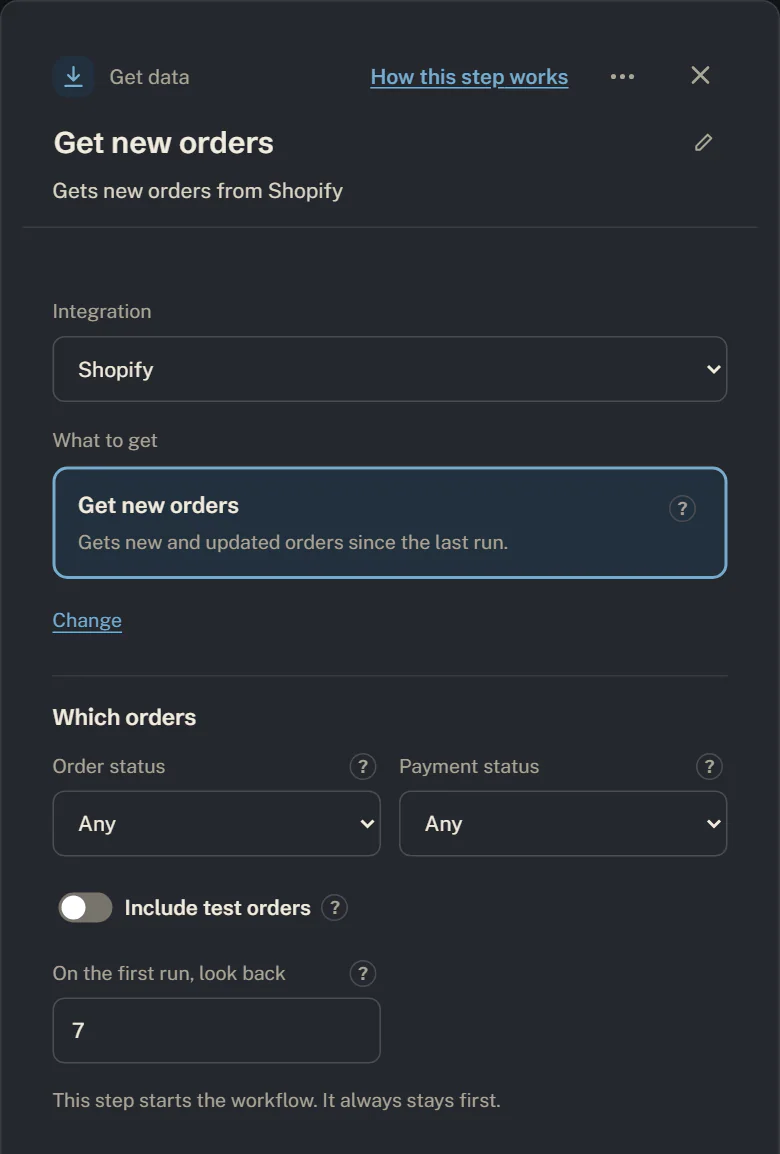
- Get data: reads records. It starts a workflow, like Pull from an endpoint. The list is headed What to get.
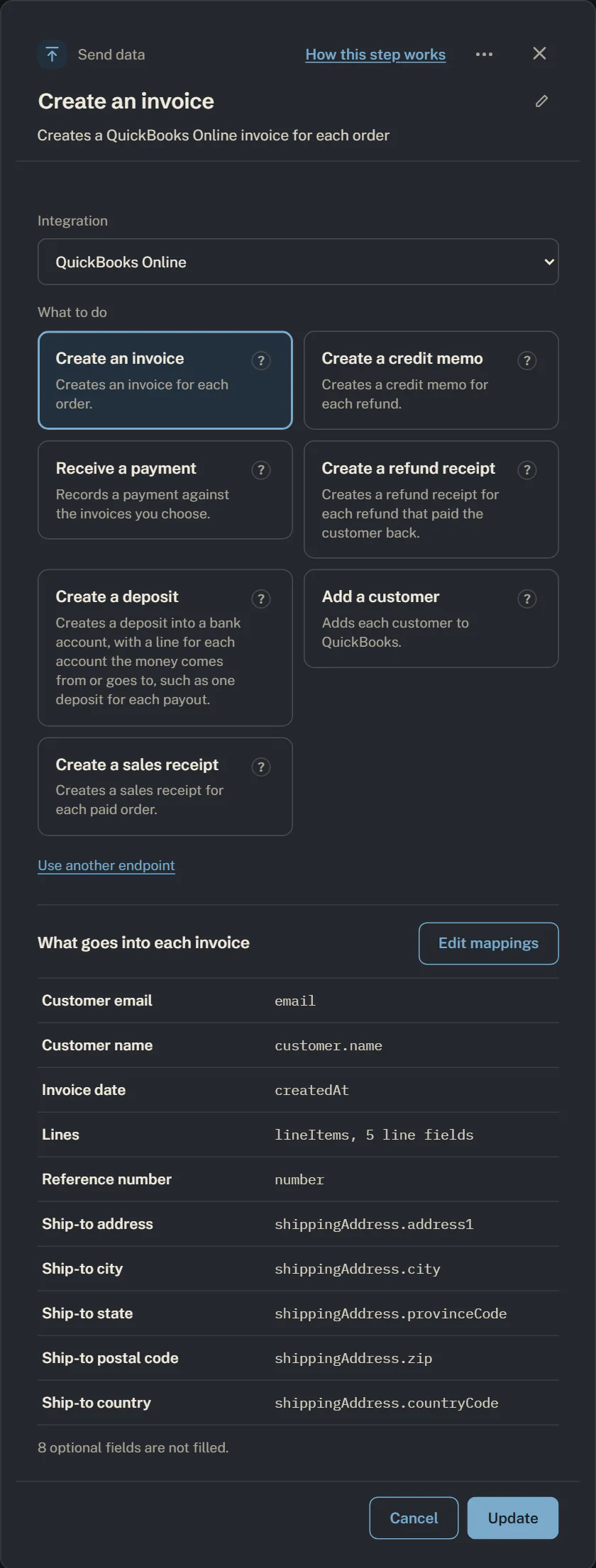
- Send data: creates records in the app, for each row. It is usually the last step. The list is headed What to do.
- Get details: looks up one thing for each row and adds what it finds. The list is headed What to look up.
The actions here are a head start, not a limit. Use another endpoint, the last line of the list, opens the usual Pull, Push or Get details settings for any endpoint of the app, and Use a built action instead brings the list back. A workflow can also start from When something changes in QuickBooks Online, Shopify, Square, HubSpot or ERPNext, which hands the first steps the changed records without a Get data step.
 (opens the full size image in a new tab)
 (opens the full size image in a new tab)
Getting data
 (opens the full size image in a new tab)
 (opens the full size image in a new tab)
A chosen action shows as one card, with Change to see the list again. Under Which orders (or Which records, Which invoices and so on) are the choices of that action, required ones first, with the rest under More settings. A list of choices, such as accounts or terms, is read from the connected app with a Refresh link. Most Get actions read what is new or updated since the last run and take On the first run, look back, a number of days for the first run. On Starter, Pro and Business, and on Free for a workflow that starts when someone clicks Run.
QuickBooks Online
| Action | What it gets | Counts as a record |
|---|---|---|
| Get invoices | New and updated invoices since the last run. Which invoices: any, not paid in full or paid in full. | No |
| Get sales receipts | New and updated sales receipts. | No |
| Get credit memos | New and updated credit memos. | No |
| Get payments | New and updated payments. | No |
| Get customers | New and updated customers. Can include inactive ones. | No |
| Get vendors | New and updated vendors. Can include inactive ones. | No |
| Get items | New and updated items, of any or one item type. Can include inactive ones. | No |
| Get bills | New and updated bills. Which bills: any, not paid in full or paid in full. | No |
Deleted records are not included.
Shopify
| Action | What it gets | Counts as a record |
|---|---|---|
| Get new orders | New and updated orders since the last run. Choose the order status and payment status, and whether test orders are included. | No |
| Get refunds | New refunds since the last run. | No |
| Get payouts | New Shopify Payments payouts since the last run, with their fees, and the transactions in each payout if you want them. | No |
| Get products | Products and their variants, all or only those that changed, of any or one product status. | No |
| Get customers | New and updated customers, or only customers who ordered. | No |
Getting data is free: records count when a later step sends or writes them. Test runs read a single record.
Every Shopify Get action has a section, Fields this action reads, where you turn off the fields you don't need and add any other field Shopify has, metafields included. See Choose the fields a Shopify step reads.
HubSpot
HubSpot has one Get data action for each kind of record: Get contacts, Get companies, Get deals, Get products and Get line items. Each one gets new and changed records since the last run, with all their fields, custom fields included. Deleted records aren't included. To send data to HubSpot, or to read one record, a deal's pipeline or its linked records, choose Use another endpoint: HubSpot's other endpoints work like any API's.
Square
| Action | What it gets | Counts as a record |
|---|---|---|
| Get payments | Completed payments since the last run, with their amount, tip, fees, customer and receipt link. | No |
| Get refunds | Completed refunds since the last run, with the payment they belong to and their reason. | No |
| Get payouts | Paid payouts since the last run, with their amount and arrival date. | No |
| Get customers | New and changed customers since the last run. | No |
| Get invoices | New and changed invoices since the last run, with their status and recipient. | No |
| Get daily sales | One row for each location and business day: the items sold, tax, tips, service charges, gift cards sold and used, what was paid by card, cash and other ways, and the day's refunds. Business day ends at says when your trading day ends in each location's own time zone, and a day is read once, after it has ended. Also takes Start from and Locations. | No |
Square only reads, so it has no Send data actions. Amounts are whole numbers in the currency's smallest unit, such as cents, and each has a decimal twin. To read anything else Square has, or one record by its ID, choose Use another endpoint: Square's other endpoints work like any API's.
ERPNext
| Action | What it gets | Counts as a record |
|---|---|---|
| Get customers | New and updated customers. Can include disabled ones. | No |
| Get items | New and updated items. Can include disabled ones. | No |
| Get sales invoices | New and updated sales invoices with their lines. Which sales invoices: submitted, drafts, cancelled or any. Can leave out invoices paid in full. | No |
| Get sales orders | New and updated sales orders with their lines. Which sales orders: submitted, drafts, cancelled or any. | No |
| Get payment entries | New and updated payment entries with the invoices each one pays. Which payment entries: submitted, drafts, cancelled or any. | No |
Each one reads only the records that changed since the last run. Every ERPNext Get action has a section, Fields this action reads, where you turn off the fields you don't need and add any other field your site has, custom fields and the lists inside a record included, or choose Every field of the record. Ladeworks asks ERPNext for exactly those fields, because ERPNext sends only the fields you ask for.
Sending data
 (opens the full size image in a new tab)
 (opens the full size image in a new tab)
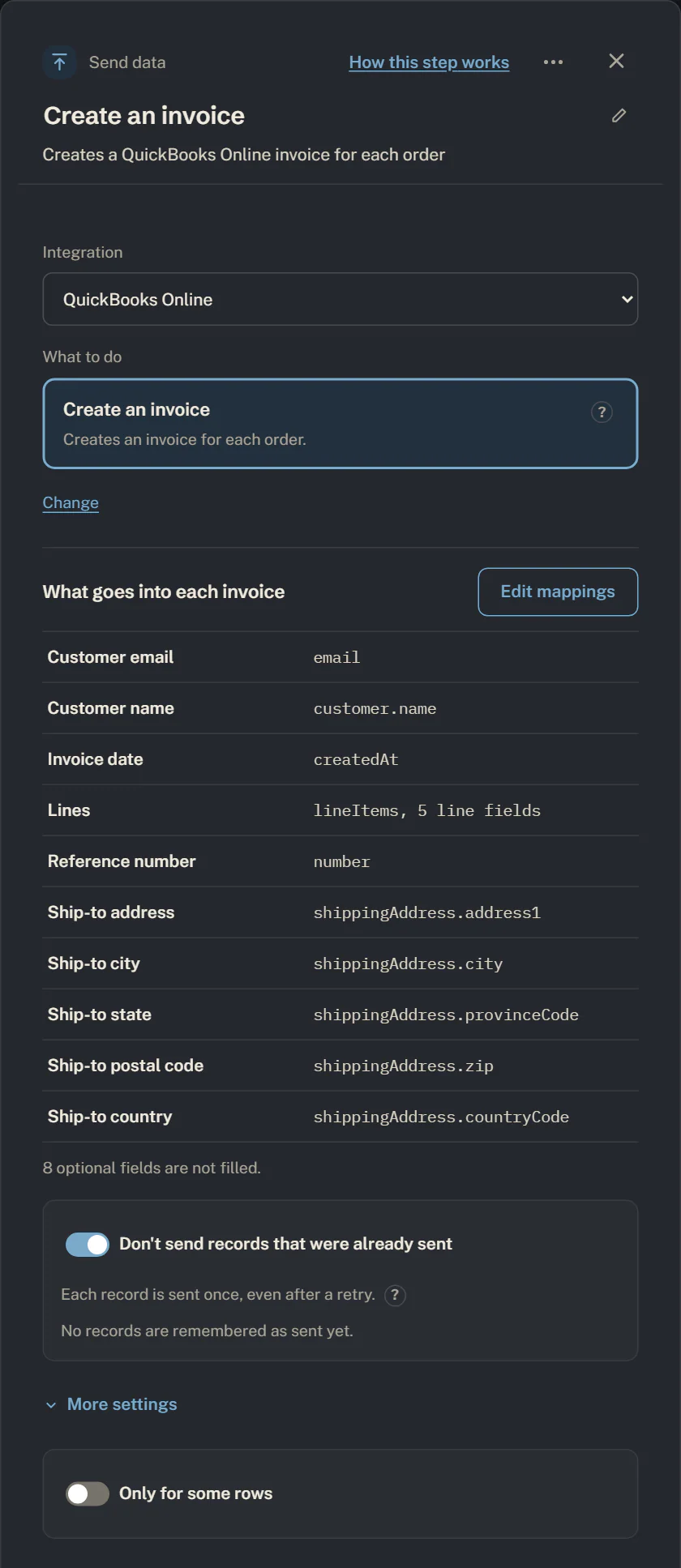
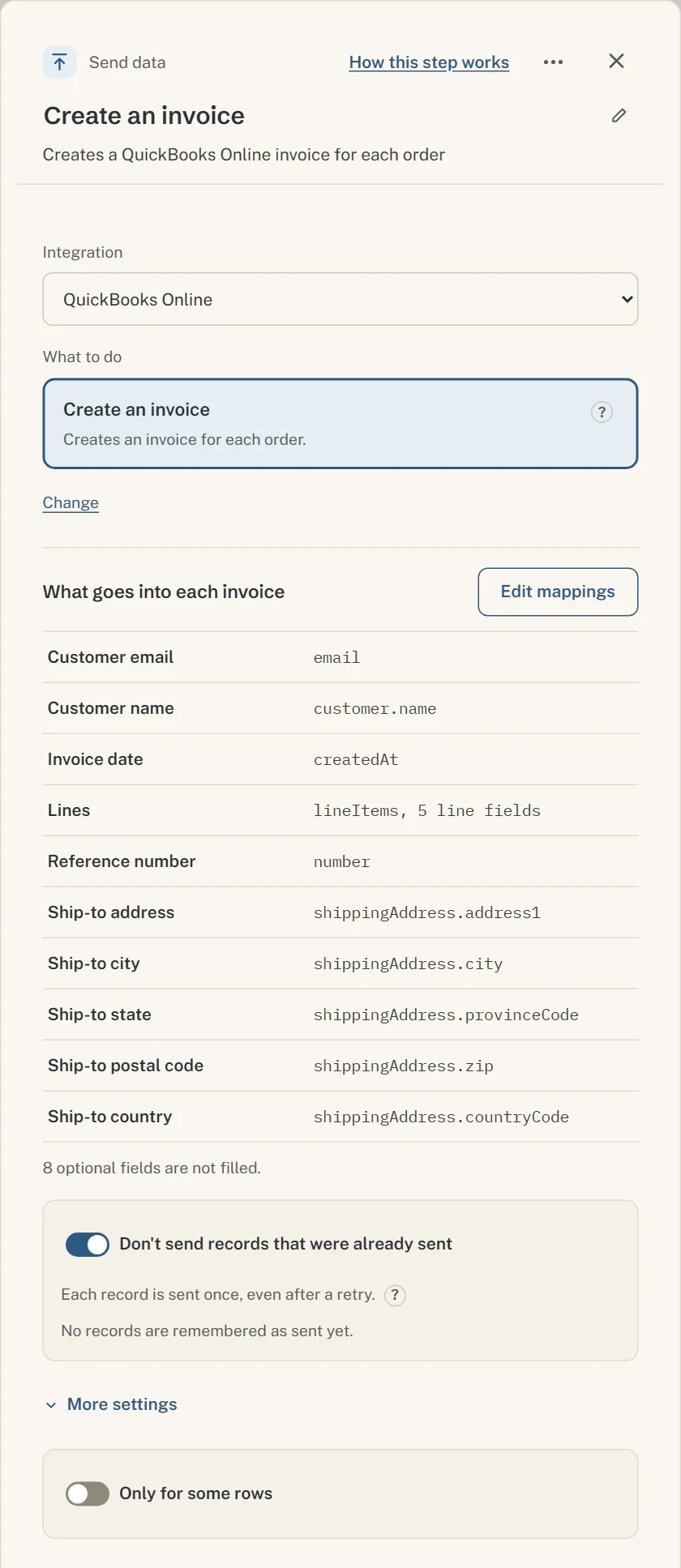
Under What goes into each invoice (the word follows the action) the step lists what fills each field of the action, and Not filled yet marks a required field nothing fills. Edit mappings switches the same window to the Map fields step before it, with a Back to link at the top that returns to this step. Nothing opens on top of anything else. With no Map fields step before it, fields of the row with the same names are sent, and the step says so. Don't send records that were already sent is on for every Send data step, and Tell records apart by is chosen for you, under More settings. See Push to an endpoint.
The usual mappings are filled in for you when a Send data action follows a Get data action, or follows a change trigger of the matching record type. Shopify orders fill an invoice or a sales receipt: the customer's email and name, the date, one line for each line item (SKU, item name, quantity, amount, description), the order number as the reference number, the ship-to address (its second line as Ship-to address line 2), the shipping method as Ship via, the order email as Email to, and the order name and note as the memo. Shopify refunds fill a credit memo or a refund receipt in the same way, with the order name as the memo. Shopify customers fill Add a customer, and Shopify payouts fill the lines of a deposit, with the accounts you choose when you start from the payouts template. Shopify orders fill an ERPNext sales invoice in the same way, HubSpot deals fill an ERPNext sales order, and ERPNext sales invoices fill a QuickBooks invoice. A mapping you set always wins.
QuickBooks Online
| Action | What it does | Counts as a record |
|---|---|---|
| Create an invoice | Creates an invoice for each order. Adds the customer if they are new. Matches each line to an item by SKU first, then by name, and says which line has no match. Checks the reference number first, because QuickBooks allows two invoices with the same number, and skips the row if it is already used. QuickBooks keeps 21 characters of a reference number: a longer one, such as a payment ID from a payment service, keeps its last 21, and a note on the invoice and in the run says so. | 1, or 2 when it adds a customer |
| Create a sales receipt | Creates a sales receipt for each paid order. Adds the customer if they are new. Matches lines the same way. | 1, or 2 when it adds a customer |
| Create a credit memo | Creates a credit memo for each refund. Can take the original sale's reference number, and then puts the credit memo on that sale's customer. | 1, or 2 when it adds a customer |
| Create a refund receipt | Creates a refund receipt for each refund that paid the customer back, from the account you choose under Refund from. | 1, or 2 when it adds a customer |
| Receive a payment | Records a payment against the invoices you list, by their reference numbers, for the whole balance or an amount you give. With no list, the payment stays as credit for the customer. | 1, or 2 when it adds a customer |
| Create a deposit | Creates a deposit into a bank account, with a line for each account the money comes from or goes to, such as one deposit for each payout. | 1 |
| Add a customer | Adds each customer to QuickBooks. A customer that is already there is skipped. | 1 when it adds one |
Shopify
| Action | What it does | Counts as a record |
|---|---|---|
| Set stock | Sets how many of a product a Shopify location has, finding the product by SKU. A SKU already at that number is skipped. | 1 for each SKU whose stock changes |
ERPNext
| Action | What it does | Counts as a record |
|---|---|---|
| Create a sales invoice | Creates a sales invoice for each row, with one line for each item. Finds the customer by ID, email or name and adds them if they are new. Saved as a draft unless Submit it is on, which posts it to the books. | 1, or 2 when it adds a customer |
| Create a sales order | Creates a sales order for each row in the same way, with a delivery date. Saved as a draft unless Submit it is on. | 1, or 2 when it adds a customer |
| Record a payment | Records a payment against a submitted sales invoice, for what is still owed or an amount you give. Submit it is on, because a payment only counts once it is submitted. | 1 |
A row the app refuses is skipped with a message that says what to change, and run details offer Retry row, the same as for any Push. The extra record for a customer is counted only when Ladeworks really adds one.
Getting details
A Get details action looks up one thing for each row and adds what it finds as fields: What to send for each row says which field of the row fills each input, the usual ones filled in when the step follows a Shopify Get data action, and What to add to the row says how many fields it adds, with Show them for the names. Name prefix (optional) and If nothing comes back are under More settings.
| Action | What it does | Counts as a record |
|---|---|---|
| Find or create a customer (QuickBooks Online) | Finds the customer by email or name, or adds them. Adds the customer's id, name, email and balance to the row, and whether this step created them. | No when found, 1 each time it creates one |
| Find an item (QuickBooks Online) | Finds an item by SKU or name. | No |
| Get sale details (Square) | Reads one whole sale from a payment ID or an order ID: the items with their SKUs, discounts, tax, tips, service charges, gift cards sold and used, how it was paid, the customer and the location. A sale paid in several payments waits until the last one is in, so it is sent once. | No |
| Get refund details (Square) | Reads one refund from its refund ID: the items returned when Square has them, the original sale, the customer and the location. | No |
| Get payout lines (Square) | Reads what is inside a paid payout from its payout ID: the payments, refunds, fees, reserves and other adjustments. Adds the payout's totals and a list of its lines to the row, after checking that the lines add up to the payout. Skips a payout that does not add up, one that took money from your bank, and one that is not paid yet, with a message that says why. | No |
| Find or create a customer (ERPNext) | Finds the customer by email or name, or adds them. Adds the customer's ID, name and email to the row, and whether this step created them. A new customer can be given a type, group, territory, phone and tax ID. | No when found, 1 each time it creates one |
| Find or create an item (ERPNext) | Finds an item by its item code, or adds it with the name, group, unit and selling price you give. Adds the item's ID, code, name and selling price to the row, and whether this step created it. | No when found, 1 each time it creates one |
Details requests to an endpoint you choose are free. A built-in action that can create what it does not find counts 1 record each time it creates one, and the step says so under What to add to the row.
What counts as a record
The tables above give the count for each action. In short: getting and looking up are free; sending counts 1 for each record made, plus 1 when the action also adds a customer that was new; a row skipped, already sent or refused does not count. What counts as a record has the full rules, and the builder's estimate shows the expected records for a run.