DocsShaping data
Combine with another source
Brings a second source into the workflow. It reads every row of another source and either adds those rows to the ones coming in, or matches each incoming row with the row of the other source that has the same key and adds its fields. On Starter, Pro and Business.
Use it to send Shopify orders and Amazon orders on as one set, or to add the price for each order line from a price list that an API returns whole. When the other API can only answer one record at a time, use Get details for each row instead.
The other source
The source in Combine with is read the way Pull from an endpoint reads: choose the integration and an endpoint that pulls data, fill its filters, and set a number of pages to stop after, under More settings, if you want one. A connected app can offer its ready-made Get data actions here too, such as Get new orders. The other source is read page by page, with the same paging, rate limits and retries as a Pull.
Add rows
Add rows passes the incoming rows on first, then every row of the other source, as one set for the steps after it. The rows keep their own field names, so check the fields in Map fields afterwards: a field one source calls order_number and the other orderId needs a mapping for each, or a formula such as coalesce(row.order_number, row.orderId).
Add a field saying where each row came from puts a field on every row with the value you choose for each side. With the field channel and the values Shopify for the incoming rows and Amazon for the other source, each row says where it came from, and a Filter rows or Map fields step later can use it.
Match rows
 (opens the full size image in a new tab)
 (opens the full size image in a new tab)
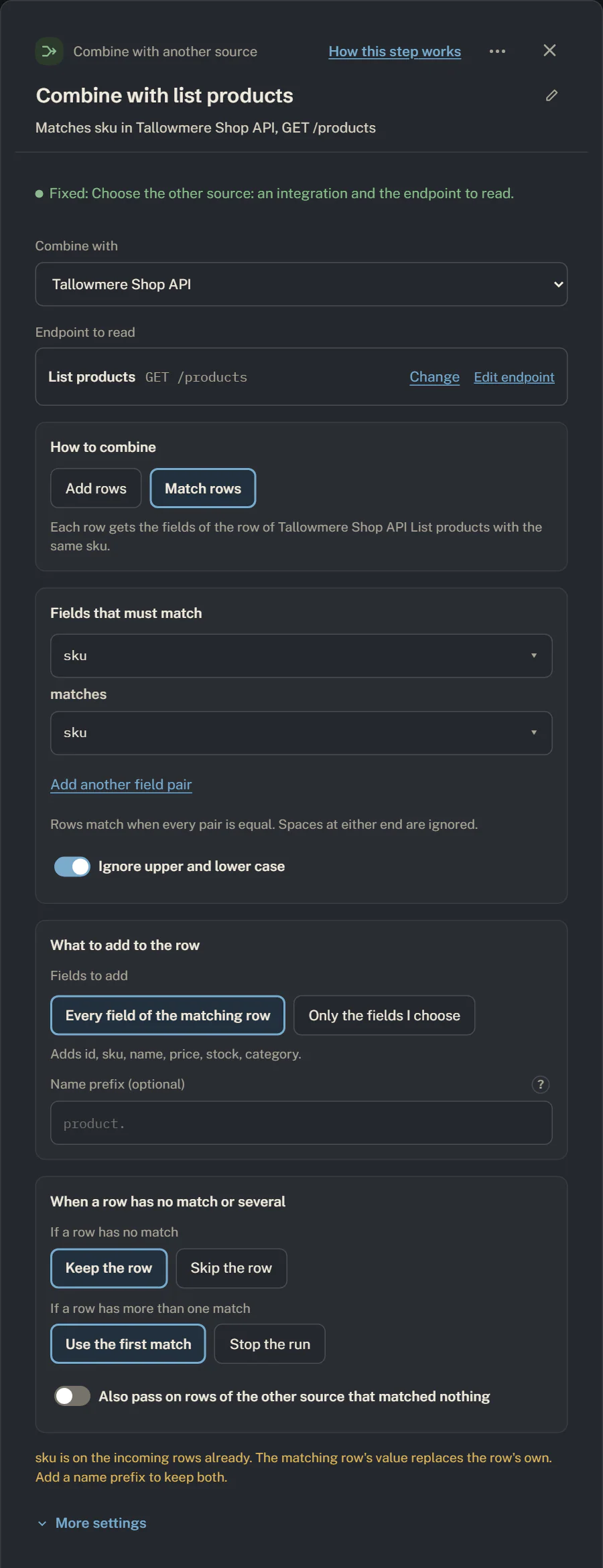
Match rows pairs each incoming row with the row of the other source that has the same key, and adds the fields of that row to it, the way Get details for each row adds what it gets back.
- Fields that must match: one or more pairs of fields, a field of the incoming rows and a field of the other source, such as sku and Sku. With more than one pair, every pair must be equal.
- Keys are compared with spaces at the start and end left out, so SKU-1 matches SKU-1. Ignore upper and lower case is on by default, so sku-1 matches SKU-1. Turn it off when case matters.
- What to add to the row: every field of the match, or only the fields you choose. Name prefix (optional) goes in front of each added name: price. gives price.amount. A field with the same name as one the row already has, after the prefix, replaces the row's own.
- If a row has no match: Keep the row (the default) passes it on without added fields, Skip the row lists it in run details as skipped, with the cause Source data.
- If a row has more than one match: Use the first match (the default), in the order the other source returned them, or Stop the run, which ends the run and names the key that matched more than once.
- Also pass on rows of the other source that matched nothing: off by default. When it is on, those rows follow the incoming rows, with their own fields.
A row with an empty key never matches. To match, Ladeworks reads the whole other source before the first incoming row goes on, and keeps it only while the run lasts. It reads at most 1,000,000 rows: a larger source stops the run with a message. Filter the other source with its endpoint's filters, or split the work into smaller runs.
Cost and the run line
Each page read from the other source is one API call, like a Pull. Combining is free: records count where they always do, when the rows are pushed, written to a file or sent in a message, not when they are combined. Rows added from the other source count when a later step delivers them, like any other row. The estimate in the builder includes the other source's rows when it can count them, and otherwise says it will estimate after the first run.
A run says what happened, for example "Added 120 rows from Amazon Get orders" or "Matched 98 of 120 rows, 22 had no match".